
Management of a LinkedIn Group – Practical guidelines
Chapter 1: What to Post — Crafting Content That Guides, Educates, and Builds Trust
People don’t join LinkedIn groups to be sold to. They join to learn, to connect with peers, and to explore new solutions. Your role as a manager is to deliver content that meets them where they are in their buying journey — from orientation to decision.
1. Awareness Stage: Orientation & Discovery
At this stage, members are educating themselves. They’re not ready to buy — they’re looking to understand the market.
Post ideas:
-
Industry insights and macro trends
-
Regulatory updates or cross-border trade changes
-
Infographics on logistics, energy, tech, or policy
-
Links to authoritative sources like AfCFTA, World Bank, UNCTAD
2. Consideration Stage: Exploring Solutions
Now, your members are comparing approaches. They want to see how businesses or innovations solve real problems.
Post ideas:
-
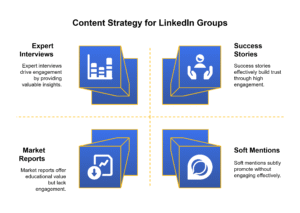
Case studies
-
How-to guides for solving sector-specific issues
-
Tools and technology reviews
-
Panel highlights from industry events in Africa
✅ 3. Decision Stage: Evaluating Providers
This is your opportunity to build credibility, not push sales. Let your expertise shine through examples and testimonials.
Post ideas:
-
Client success stories
-
Insights into your work process or unique value
-
Soft mentions of your services within thought leadership content
Tip: Link your content to challenges that members experience. The best B2B content doesn’t talk about your product — it talks about the problems it solves.
Chapter 2: Managing the Group – Tools & Techniques for Engagement and Visibility
Creating great content is step one. Making sure it’s seen and acted upon is step two. As a LinkedIn group manager, you have access to tools that can multiply your impact.
l
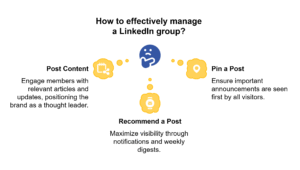
✍️ Post Regularly
Consistency builds expectation. Share 1–3 posts per week and engage with replies.
Encourage members to comment, ask questions, or tag others.
Pin a Post
Use the “Pin” feature to lock important content at the top of the group feed. Every visitor will see it first.
Best use cases:
-
Welcome messages for new members
-
Group rules or announcements
-
Special content (e.g., e-books, whitepapers, webinar invites)
Recommend a Post
This is your secret weapon as a manager.
When you recommend a post:
-
It is sent as a notification to all group members.
-
It is included in LinkedIn’s weekly digest email, putting your content directly in inboxes.
Use this for:
-
Your best performing educational content
-
Time-sensitive offers or calls to action
-
Event announcements or surveys
Monitor Insights
Access group analytics to understand:
-
Member demographics
-
Post engagement metrics
-
Growth over time
This allows you to refine your content and adjust to audience interests.
See this video for a practical tutorial how to post on LinkedIn:
Conclusion: Think Like a Publisher, Lead Like a Peer
Being a LinkedIn group manager in Africa is not about pushing content — it’s about curating a community. The managers who succeed are those who:
-
Share insights that align with business challenges
-
Engage with the group authentically
-
Build trust through consistent, high-value content
Remember: You’re not just managing posts — you’re building a trusted environment for B2B professionals who are navigating complex decisions across sectors and countries.
And when the time comes for those professionals to choose a provider, guess who they’ll turn to?
see also the following blogs: